How to Log a Habit Without Opening the App
The log you never make is the one that required four taps. Here are three ways to record a habit on iPhone without opening anything.
By Mar San Agustin
The short answer
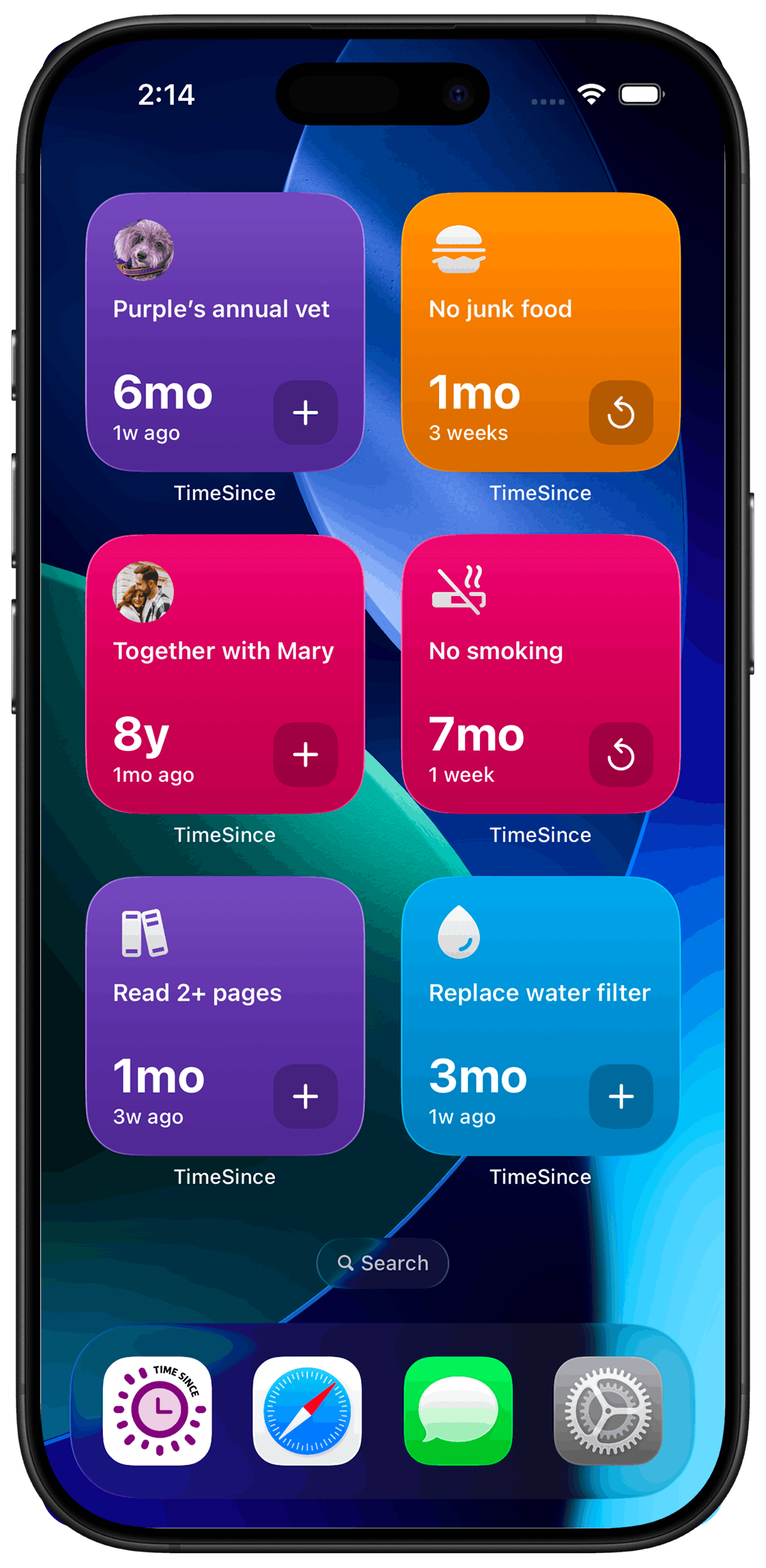
You do not need to open TimeSince to log a counter. A home screen widget records it in one tap straight from your lock or home screen, and it is available on the free tier. With Pro you can also ask Siri out loud, or stick an NFC tag on the thing itself and tap your phone against it. Pick whichever one sits closest to where the habit actually happens: the method that wins is the one with the fewest steps between noticing and logging.
The best log is the one you never had to remember to make.
Most habit tracking fails at a very specific moment: you notice you did the thing, and then you would have to unlock your phone, find an app, wait for it to load, locate the right entry, and tap it. That is four or five steps competing with whatever else is pulling at your attention right then. The habit is fine. The logging is what breaks.
So the useful question is not "which tracker has the best design?" It is "how few steps can there be between noticing and recording?"
Why friction decides this
Every step between intent and action is a chance to drop it. That is true for everyone, and it is especially true with ADHD, where the gap between "I should log this" and actually doing it is where a lot of good intentions quietly disappear.
This is also why an app being pleasant matters less than an app being reachable. A beautiful interface you have to navigate to is still a navigation. The methods below all share one property: they put the log where the habit already is.
Three ways in, ranked by friction
The home screen widget is the lowest-effort option and the one most people should start with. One tap, straight from the home screen, no unlock into the app. It is on the free tier, so there is nothing to decide before trying it.
Siri wins whenever your hands are busy or the phone is not already out. Saying it out loud is faster than finding anything, and it works from Spotlight, the Shortcuts app, and the Action Button if your iPhone has one. This is a Pro feature.
An NFC tag is the strangest-sounding and, for certain habits, by far the best. You pair an NTAG215 sticker with a counter and put it on the object itself. The water filter has a sticker on it. The pillbox has a sticker on it. You tap your phone against it and it is logged — no app, no unlock, no decision. The tag costs very little and needs no battery. Also Pro.
Which one for which habit
Match the method to where the habit physically happens:
- Something you do at your phone anyway — reading, a breathing exercise, checking in on someone: the widget.
- Something at a fixed physical place — medication, filters, pet treatments, watering: an NFC tag on the object.
- Something with your hands full or mid-task — cooking, driving, exercise, leaving the house: Siri.
- Something irregular and easy to forget entirely — see tracking the chores that don't happen every day; the tag usually wins, because the object is the reminder.
A note on over-engineering this
It is tempting to set up all three for everything. Don't. Each extra path is one more thing to maintain and one more small decision at the moment you are trying to remove decisions. Pick one per habit, use it for a week, and keep what actually fired.
The same goes for how much you track. Two or three habits logged consistently beats twelve logged for a fortnight and then ignored.
The bottom line
The method matters less than the step count. Whatever gets you from noticing to logged in one action is the right answer, and on iPhone that is a widget tap, a sentence to Siri, or a tag on the object. Everything else is the app's problem, not yours.
Step by step
- 1
Add the widget to your home screen
Long-press an empty area of your home screen, tap the + button, search for TimeSince, and pick the widget size you want. Place it where your thumb already lands.
Requires iOS 17.6 or later.
- 2
Choose which counter it logs
Long-press the widget, choose Edit Widget, and select the counter. Give each habit you log often its own widget rather than sharing one — picking from a list reintroduces exactly the friction you are removing.
- 3
Set up a Siri phrase for anything hands-busy
In the app, enable the Shortcuts integration for a counter, then ask Siri to log it by name. This also works from Spotlight, the Shortcuts app, and the Action Button on supported iPhones.
Pro feature.
- 4
Put an NFC tag on the object itself
Pair an NTAG215 sticker with a counter, then stick it on the thing the habit involves. Tapping your phone against it logs the counter without opening anything at all.
Pro feature.
- 5
Delete the methods you do not use
After a week, keep the one that actually fired and remove the rest. Three half-used logging paths are worse than one you reach for without thinking.
What TimeSince helps with
- Removes the unlock-find-tap-tap sequence that kills most logging habits
- Lets you log at the moment and place the habit happens
- Works with hands full, via Siri or a tag you tap
- Keeps an honest timestamp without you having to remember one
What TimeSince will not fix
- It will not remind you the habit exists — set a reminder for that
- It cannot log something you did not notice doing
- NFC and Siri need Pro; only the widget is on the free tier
- There is no Android version, and no web app
Frequently asked questions
Do I need TimeSince Pro for all of these?+
No. The home screen widget works on the free tier, along with logging, reminders, categories and iCloud sync for up to three counters. Siri Shortcuts and NFC pairing are Pro features, available as a subscription or a one-time lifetime purchase.
Which NFC tags work?+
NTAG215 tags. They are inexpensive, need no battery, and work as plain stickers you can put directly on the object the habit involves — a pillbox, a water filter, the fridge door.
Does the widget need the app to be open in the background?+
No. Tapping the widget records the counter directly. You do not need to unlock into the app, and nothing has to be running beforehand.
What if I forget to log something at the time?+
Open the app and adjust the timestamp. Nothing penalises a late entry, because TimeSince measures elapsed time rather than a streak, so there is no record to break by logging something an hour after the fact.
Track it without the guilt trip
TimeSince counts the time since you last did something. No streaks to break.